Avinash Kaushik comes highly recommended for web analytics, plus he seems to be an ok person! 8-)
Friday, 28 November 2008

Monday, 1 September 2008
Microsoft provides examples of the worst documentation in the software industry
During the course of my work, I rather too frequently come across Microsoft documentation which consists of definitions of the form:
Of couse a BigThing is a thing which is big!
This tells me precisely nothing.
It annoys the hell out of me so much, and Microsoft seem to me to be a company that does this more than anyone else.
I am so annoyed I am going to start to compile a list of URL's that demonstrate what I'm talking about.
Hopefully someone from Microsoft will come across my list, and then someone else at Microsoft will agree its a good idea to not insult their customers with pages upon pages of documentation that provides no real information whatsoever.
I'm not going to go round pulling out examples now... I'm just going to add to my list every time I come across one.
Here's one that just got me... you might say it was the last straw:
evictmanagedresources
Microsoft's documentation on "evictmanagedresources" says, (and I quote) "Evicts all managed resources, including Microsoft Direct3D resources and those that are driver managed." In other words, evictmanagedresources evicts all managed resources. That really helps, doesn't it, Microsoft! Ever heard of examples? Ever thought you might like to include some in your documentation. Read my lips... never ever ever make a piece of software language documentation and don't include an example of usage.
Whoever at Microsoft needs to hear that, I don't know. But someone needs to write it in red ink on their forehead.
(Happy mood, today!)
If you're suffering from having to deal with Microsoft documentation, these fellows may help... 8-) ... Microsoft Dorset
"BigThing" : a BigThing is a thing which is big.
Of couse a BigThing is a thing which is big!
This tells me precisely nothing.
It annoys the hell out of me so much, and Microsoft seem to me to be a company that does this more than anyone else.
I am so annoyed I am going to start to compile a list of URL's that demonstrate what I'm talking about.
Hopefully someone from Microsoft will come across my list, and then someone else at Microsoft will agree its a good idea to not insult their customers with pages upon pages of documentation that provides no real information whatsoever.
I'm not going to go round pulling out examples now... I'm just going to add to my list every time I come across one.
Here's one that just got me... you might say it was the last straw:
evictmanagedresources
Microsoft's documentation on "evictmanagedresources" says, (and I quote) "Evicts all managed resources, including Microsoft Direct3D resources and those that are driver managed." In other words, evictmanagedresources evicts all managed resources. That really helps, doesn't it, Microsoft! Ever heard of examples? Ever thought you might like to include some in your documentation. Read my lips... never ever ever make a piece of software language documentation and don't include an example of usage.
Whoever at Microsoft needs to hear that, I don't know. But someone needs to write it in red ink on their forehead.
(Happy mood, today!)
If you're suffering from having to deal with Microsoft documentation, these fellows may help... 8-) ... Microsoft Dorset
Monday, 4 August 2008
Do you want to debug? - annoying dialog
ENQUIRER:
Dear, Dorset Software Consultant,
On my laptop (only,not my PC) I am getting a lot of annoying dialog boxes that pop up and say there is a runtime error and do I want to debug. ["Do you want to debug?"] If I say yes, the script editor from Microsoft pops up, but I don't know what I am doing with it so I always wind up closing it. How do I get these things to leave me alone?
Dear Enquirer,
Am I right in thinking that these dialogs only appear when you are using browser software?
If so then it is probably an easy thing to fix.
Open up internet explorer options and check the select boxes shown in the graphic below.
That should fix it.

If this is occuring not just in your browser software we may have to think along some other lines... like you may have some sort of mild virus.
Three likely scenarios occur to me:
(1) Virus:
Do you have virus software installed?
(2) A piece of software or hardware driver recently installed is conflicting with some other piece of software or hardware driver:
When did the dialogs start appearing?
Did you install some piece of hardware or software just prior to when the PC started doing this?
Is it while using a particular piece of software that this happens, or is it more random than that?
(3) You have some disk or memory corruption:
When was the last time you checked your disks for errors?
Are you running out of space on any of your disk drives?
Did you recently have a power failure that rebooted your PC without shutting down properly?
Or someone shut it down using the wall power switch instead of windows “Shut down” procedure?
ENQUIRER:
I think I am getting clearer about when this happens. I think it is related to the fact that I just close my laptop when it is plugged in, don't shut down, and then unplug the laptop from the wall later, either use it on battery, or plug it in somewhere else and use it on AC. I have been wondering for awhile: When I go to shut down in Microsoft, when should I select Standby, when should I select Hibernate (I think this has to do with not running down the battery, so I'm guessing you'll say that), or Turn off (or Restart) completely?
I want to know which I should choose of the first three when I am unplugging from the wall and moving the laptop somewhere else.
"Standby" and "Hibernate" are both designed to be ways of conserving power (usually of a laptop) whilst being able to stop and resume working from whatever point you have got to. For example you don't have to close and save files (at least theoretically) you can just stop, and pickup from whereever you had got to.
The difference between Standby and Hibernate is that Hibernate copies your computer memory (including any open files) onto your hard drive, whereas Standby leaves the power going to the memory and the contents of the memory as it is.
Consequently you should expect Hibernate to take a bit longer (both going into hibernation and coming out of it). On the other hand, Hibernate should conserve more battery life, because it is not having to keep power going to the laptop memory. If the laptop is going on a longer journey, it is probably better to use hibernate, because keeping power going to the computer memory may ultimately drain the batteries to such an extent that machine gives up and powers down, potentially losing any work that you haven't saved.
See difference between "Standby" and "Hibernate"
I think somewhere I have seen a piece of software that automatically moves your computer from Standby to Hibernate when battery reserves are getting low, although I don't remember for sure. In any case I personally wouldn't count on it.
Personally, I would be inclined to always save copies of my work. If I want to avoid overwriting an existing file that I'm not sure I want to replace yet, I would simply make a new copy and keep the old until I'm happy that the new one can replace it.
Also with regard to Hibernate, I would bear in mind that if your disk drives are old, or well used, or nearly full up, or very fragmented, or have shown any signs of being liable to errors or corruption, your hibernate file is going to be susceptible to corruption during the process of putting on to the hard drive and/or restoring it off again. The outcome of restoring a corrupt hibernate file is probably not predictable.
Wednesday, 23 July 2008
Useful command line instructions
Just while I'm thinking about some of them:
netstat 20
Lists all the active tcp-ip connections, so you can check for hackers ;-)
(20 is the number of seconds before a repeat)
ipconfig /all
Lists info on all physical network connections
ipconfig /release
ipconfig /renew
Tracert ipAddress/domain name
Traces network hops to remote locations so you can check a failing connection to see where it is failing.
There's a really useful one for rebuilding the Winsock protocol stack, but I don't have it to hand.
I'll add more of these as I think of them.
netstat 20
Lists all the active tcp-ip connections, so you can check for hackers ;-)
(20 is the number of seconds before a repeat)
ipconfig /all
Lists info on all physical network connections
ipconfig /release
ipconfig /renew
Tracert ipAddress/domain name
Traces network hops to remote locations so you can check a failing connection to see where it is failing.
There's a really useful one for rebuilding the Winsock protocol stack, but I don't have it to hand.
I'll add more of these as I think of them.
What has got my COM port?
Classic phone tools problem.

When you press the dial button you get this message.
"Com port is being used by another application.
Your call cannot be completed now."

But what application! What application is the COM port being used by.
What is the solution to making PhoneTools work?
Dogztar had a crack at some similar problems. As did moorhouselondon. Scroll down to the bottom of the pages to see the solutions. (Don't be put off by the "You need to be a premium member" message. Just scroll to the bottom of the page.)
In order to find out what is competing for the COM3 port, I uninstalled the Modem. In Windows XP when the machine is re-started, Windows automatically tries to re-install the Modem.

When windows tried to reinstall the modem, a COM port conflict message came up, alerting me that in my case it is ActiveSync attempting to connect via COM3 to my PDA which is causing the conflict.
This may not be the solution in all cases, but it was the source of the competition for the COM port in mine.
ActiveSync did not in any case need to access the PDA on the COM port, because it connects just fine using USB without it. With this option deselected, both PhoneTools and ActiveSync work correctly together on the PC.

Once I had deselected ActiveSync's attempts to connect on COM3 to my PDA, phone tools now works correctly again.


When you press the dial button you get this message.
"Com port is being used by another application.
Your call cannot be completed now."

But what application! What application is the COM port being used by.
What is the solution to making PhoneTools work?
Dogztar had a crack at some similar problems. As did moorhouselondon. Scroll down to the bottom of the pages to see the solutions. (Don't be put off by the "You need to be a premium member" message. Just scroll to the bottom of the page.)
In order to find out what is competing for the COM3 port, I uninstalled the Modem. In Windows XP when the machine is re-started, Windows automatically tries to re-install the Modem.

When windows tried to reinstall the modem, a COM port conflict message came up, alerting me that in my case it is ActiveSync attempting to connect via COM3 to my PDA which is causing the conflict.
This may not be the solution in all cases, but it was the source of the competition for the COM port in mine.
ActiveSync did not in any case need to access the PDA on the COM port, because it connects just fine using USB without it. With this option deselected, both PhoneTools and ActiveSync work correctly together on the PC.

Once I had deselected ActiveSync's attempts to connect on COM3 to my PDA, phone tools now works correctly again.

Wednesday, 2 July 2008
I'm new to blogging - where do I start?
Dear Dorset Software Consutants,
I will be setting up a blog later this summer and I'd love to hear some of your experiences with blogging.
I'm really after a number of bits of information. For a start what service would you recommend?
Who reads your blog? Is it public or private? How do I relate my blog to my business or other projects I am working on?
Many thanks for any help you can give me.
Rather than having one blog, you may notice that I have lots of blogs.
(And web sites, etc. etc.)
The blogs and sites and etc all connect up with each other in various different ways. This then provides multiple alternative routes into what is essentially all the same project.
The project has a number of different faces, each blog or web site provides a different face on the project, but from my point of view there is only ONE PROJECT.
The conclusion I came to is that really what an active participant in the global discourse on business, prosperity, productivity and accomplishment needs is not really a web-site or a blog or any such thing… more rather it is a “web presence”. You heard it here first!
;-)
Saturday, 14 June 2008
Creating a linked server for Sage line 50 version 14 on Microsoft SQL server 2005
Creating a linked server for Sage line 50 version 14 on Microsoft SQL server 2005.
Although documentation exists for creating linked servers on Microsoft SQL server 2005, and documentation exists regarding the Sage Line 50 v 14 (2008) ODBC driver, I couldn't anywhere find documentation that combined both.
If there is any, please let me know in the comments.
When I tried a fairly standard set of options for creating a linked Sage Line 50 version 14 server on SQL 2005, I tended to get problems like this:
Figure.1

The graphic shows an attempt to use the Sage Stock table via the linked server in a view on the SQL 2005 server.
You get back a few rows (the number varies) and then the error occurs:
"Row handle referred to deleted row or row marked for deletion"
and
"OLE/DB provider 'MSDASQL' Irowse getdata returned 0x80040e23"
and
"Could not get the data of the row from the OLE/DB provider 'MSDASQL'"
Other strange phenomena occured, like from an ADP (Access data project) connecting to a database that referenced the linked server, the sa account was able to connect, whereas a domain account with full access to the database and server admin rights on the SQL server was not able to use the linked server, even though all accounts were being mapped to a valid sage account with every permission under the sun granted to it. Before we could discover that, however, we had to get the thing to connect at all. And how we did that is as follows:
I spent a long time figuring it out, but maybe I'm the only person in the known universe that has ever needed to set up a Sage Line 50 linked server on Microsoft SQL 2005, so unless someone actual prompts me for more detail I'm going to be brief but include the critical things I noticed along the way.
First have a look at the following two graphics:
Figure.2
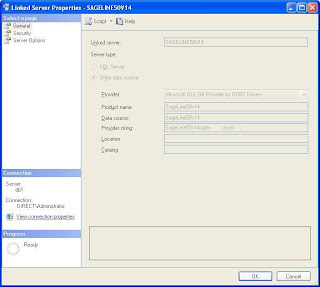
Figure.3

The first of these you have undoubtedly tried all the settings of the ODBC driver under the sun in an attempt to make it work (if you've come this far).
The second graphic however you may have passed over.
It sets the OLEDB provider for ODBC datasources settings for all linked server using the OLEDB provider for ODBC that are running on the same server.
It is not at all obvious to me what you are supposed to do if you have ODBC sources that need different alternative settings here, but I was "blessed" with only needing to conect to Sage Line 50 from SQL 2005, so I didn't have to deal with that particular problem.
The way to get to that dialog is to right click on the SQL Server Management studio hierarchy branch as showing in the graphic below:
Figure.4

As per the request from the blogger "Boozer" from St Albans (see comments), I have added some additional detail.
These are the 2nd and 3rd pages from linked server properties dialog. (The first page is already showing above.)
Figure.5: Security tab of linked server properties dialog:

Figure.6: Sever Options tab from linked server propeties dialog:
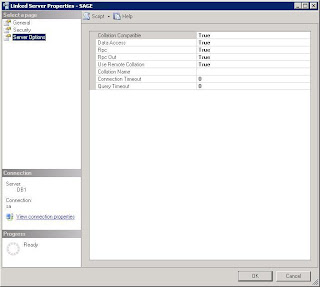
Figure.7: This grahic shows my Sage 50 version 14 ODBC settings.

I also scripted out the creation script of my linked server using the following menu command in the SQL 2005 Managemenet studio tool.
Figure.8

This gave me the script shown below:
You should be able to execute this SQL script in a query window against your server to produce an identical linked server setup to the one I have.
Some of the keys for us I think were as follows:
(1) Setting the "Zero level only" flag in the OLE/DB provider for ODBC (MSDASQL) properties dialog. (See Figure.3 above.) You can access this dialog via the right-mouse menu shown in Figure.4. Before I did this I tended to get the message "Row handle referred to a deleted row or a row marked for deletion" when running a SQL query against a recordset from the linked server. SQL tools would return a few rows, anything from 1 to about 5 or 6 before coming back with this error. The number returned any time the query was run was not always the same but, tiny compared the number of records I was expecting.
(2) We discovered there was a difference when trying to connect to the sage linked server when we were using integrated security accounts vs. when we were using SQL server native accounts. The conclusions here were not very complete. Integrated NT domain accounts worked when connecting via some of the Sage accounts, but did not work when connecting via other sage accounts, even Sages accounts that had been given maximum permisions to everything on Sage. Sage accounts that did not work with the integrated NT domain SQL server accounts did however work when using the SAGE Linked server via the security context of a Native SQL Server 2005 account.
(3) Much of what we were doing had been upgraded from pervious versions of SQL server, Sage and NT. The NT domain had been upgraded from a windows small business server to domain controller to an Active Directory. Sage accounts that worked with the new active directory accounts tended to be ones that had existed on the previous Sage installation.
Sponsored by Dorchester (in Dorset) Software
Although documentation exists for creating linked servers on Microsoft SQL server 2005, and documentation exists regarding the Sage Line 50 v 14 (2008) ODBC driver, I couldn't anywhere find documentation that combined both.
If there is any, please let me know in the comments.
When I tried a fairly standard set of options for creating a linked Sage Line 50 version 14 server on SQL 2005, I tended to get problems like this:
Figure.1

The graphic shows an attempt to use the Sage Stock table via the linked server in a view on the SQL 2005 server.
You get back a few rows (the number varies) and then the error occurs:
"Row handle referred to deleted row or row marked for deletion"
and
"OLE/DB provider 'MSDASQL' Irowse getdata returned 0x80040e23"
and
"Could not get the data of the row from the OLE/DB provider 'MSDASQL'"
Other strange phenomena occured, like from an ADP (Access data project) connecting to a database that referenced the linked server, the sa account was able to connect, whereas a domain account with full access to the database and server admin rights on the SQL server was not able to use the linked server, even though all accounts were being mapped to a valid sage account with every permission under the sun granted to it. Before we could discover that, however, we had to get the thing to connect at all. And how we did that is as follows:
I spent a long time figuring it out, but maybe I'm the only person in the known universe that has ever needed to set up a Sage Line 50 linked server on Microsoft SQL 2005, so unless someone actual prompts me for more detail I'm going to be brief but include the critical things I noticed along the way.
First have a look at the following two graphics:
Figure.2

Figure.3

The first of these you have undoubtedly tried all the settings of the ODBC driver under the sun in an attempt to make it work (if you've come this far).
The second graphic however you may have passed over.
It sets the OLEDB provider for ODBC datasources settings for all linked server using the OLEDB provider for ODBC that are running on the same server.
It is not at all obvious to me what you are supposed to do if you have ODBC sources that need different alternative settings here, but I was "blessed" with only needing to conect to Sage Line 50 from SQL 2005, so I didn't have to deal with that particular problem.
The way to get to that dialog is to right click on the SQL Server Management studio hierarchy branch as showing in the graphic below:
Figure.4

Addendum - scripting out Sage Line 50 Linked server on SQL 2005
As per the request from the blogger "Boozer" from St Albans (see comments), I have added some additional detail.
These are the 2nd and 3rd pages from linked server properties dialog. (The first page is already showing above.)
Figure.5: Security tab of linked server properties dialog:

Figure.6: Sever Options tab from linked server propeties dialog:

Figure.7: This grahic shows my Sage 50 version 14 ODBC settings.

I also scripted out the creation script of my linked server using the following menu command in the SQL 2005 Managemenet studio tool.
Figure.8

This gave me the script shown below:
/****** Object:  LinkedServer [SAGE_Linked_Server]    Script Date: 06/22/2008 20:56:02 ******/
EXEC master.dbo.sp_addlinkedserver @server = N'SAGE_Linked_Server', @srvproduct=N'SageLine50v14', @provider=N'MSDASQL', @datasrc=N'SageLine50v14', @provstr=N'SageLine50v14;uid=FillinTheBlank;pwd=FillinTheBlank;'
GO
EXEC master.dbo.sp_serveroption @server=N'SAGE_Linked_Server', @optname=N'collation compatible', @optvalue=N'true'
GO
EXEC master.dbo.sp_serveroption @server=N'SAGE_Linked_Server', @optname=N'data access', @optvalue=N'true'
GO
EXEC master.dbo.sp_serveroption @server=N'SAGE_Linked_Server', @optname=N'dist', @optvalue=N'false'
GO
EXEC master.dbo.sp_serveroption @server=N'SAGE_Linked_Server', @optname=N'pub', @optvalue=N'false'
GO
EXEC master.dbo.sp_serveroption @server=N'SAGE_Linked_Server', @optname=N'rpc', @optvalue=N'true'
GO
EXEC master.dbo.sp_serveroption @server=N'SAGE_Linked_Server', @optname=N'rpc out', @optvalue=N'true'
GO
EXEC master.dbo.sp_serveroption @server=N'SAGE_Linked_Server', @optname=N'sub', @optvalue=N'false'
GO
EXEC master.dbo.sp_serveroption @server=N'SAGE_Linked_Server', @optname=N'connect timeout', @optvalue=N'0'
GO
EXEC master.dbo.sp_serveroption @server=N'SAGE_Linked_Server', @optname=N'collation name', @optvalue=null
GO
EXEC master.dbo.sp_serveroption @server=N'SAGE_Linked_Server', @optname=N'lazy schema validation', @optvalue=N'false'
GO
EXEC master.dbo.sp_serveroption @server=N'SAGE_Linked_Server', @optname=N'query timeout', @optvalue=N'0'
GO
EXEC master.dbo.sp_serveroption @server=N'SAGE_Linked_Server', @optname=N'use remote collation', @optvalue=N'true'
You should be able to execute this SQL script in a query window against your server to produce an identical linked server setup to the one I have.
Some of the keys for us I think were as follows:
(1) Setting the "Zero level only" flag in the OLE/DB provider for ODBC (MSDASQL) properties dialog. (See Figure.3 above.) You can access this dialog via the right-mouse menu shown in Figure.4. Before I did this I tended to get the message "Row handle referred to a deleted row or a row marked for deletion" when running a SQL query against a recordset from the linked server. SQL tools would return a few rows, anything from 1 to about 5 or 6 before coming back with this error. The number returned any time the query was run was not always the same but, tiny compared the number of records I was expecting.
(2) We discovered there was a difference when trying to connect to the sage linked server when we were using integrated security accounts vs. when we were using SQL server native accounts. The conclusions here were not very complete. Integrated NT domain accounts worked when connecting via some of the Sage accounts, but did not work when connecting via other sage accounts, even Sages accounts that had been given maximum permisions to everything on Sage. Sage accounts that did not work with the integrated NT domain SQL server accounts did however work when using the SAGE Linked server via the security context of a Native SQL Server 2005 account.
(3) Much of what we were doing had been upgraded from pervious versions of SQL server, Sage and NT. The NT domain had been upgraded from a windows small business server to domain controller to an Active Directory. Sage accounts that worked with the new active directory accounts tended to be ones that had existed on the previous Sage installation.
Sponsored by Dorchester (in Dorset) Software
Saturday, 31 May 2008
Select file to crack - Virus information
Quite a lot has been documented about the Troj/BagleDl-BX, W32/Mitglieder.VD, hldrrr.exe, "Rootkit Haxdoor", "Hacktool.Rootkit", Trojan.Tooso.R, srosa.sys and wintems.exe
Sophos,
Spybot,
prevx.com,
symantec,
symantec again,
siusic.com,
spybot,
techsupportforum.
And related problems - such as that it destroys safe mode boot up.
hijackthis-forum,
devshed,
castlecops
[Incidentally with regard to the safe mode boot up registry problem I used this version of SafeBootKeyRepair.exe on 30May2008 on a Windows XP SP2 machine and it appeared to work in restoring the operation of Safe Mode without ill effects.]
The fellow on siusic noted (at the end of his post on the link just above) that this virus tended to get activated by starting Internet Explorer. And as the only external bits of software that IE launches at start up are 3rd party toolbars they uninstalled all the IE toolbars, and this helped reduce the activity of this virus.
I did the same and sure enough it helped.
About 3 more Symantec Anti-virus full scans down the road and a couple of reboots, and still at start up I get the "Select file to crack" message.
So I look on the registry keys:
HKEY_CURRENT_USER\Software\Microsoft\Windows\CurrentVersion\Run and
HKEY_LOCAL_MACHINE\SOFTWARE\Microsoft\Windows\CurrentVersion\Run
to see if I can stop anything suspicious.
Interestingly I see the following:
HKEY_CURRENT_USER\Software\Microsoft\Windows\CurrentVersion\Run\swg
which is running:
C:\Program Files\Google\GoogleToolbarNotifier\GoogleToolbarNotifier.exe
Also I notice it has once again created this key in the registry: HKEY_CURRENT_USER\Software\FirstRRRun
Now GoogleToolbarNotifier.exe as you may know from what-is-exe.com is supposedly an exe that monitors your browser to see if anything tries to change your default search engine. However I'm wondering why after I have un-installed Google toolbar why this file is still starting up when windows boots so I go and check the file and I discover the file has a curious red cross icon, and bizarre copyright information. It refers to "microsoft" without any (c) or years.
Clearly whatever version of this malware virus I have inherited has replaced the real GoogleToolbarNotifier.exe with its virus alternative.
The "Select file to crack" dialog is being created by "CTHELPER.EXE" which is supposed to be a supporting file for Creative Labs Soundblaster devices (see liutilities ... but clearly not in my case.
A search of the machine shows that there are 4 copies of CTHELPER.EXE on the machine in question, these are in c:\Drivers\Audio\addon\common\amd64, c:\Drivers\Audio\addon\common\i386, C:\WINDOWS, and C:\WINDOWS\System32. The version of the file in C:\WINDOWS\System32 has the curious red cross on it like the hijacked version of GoogleToolbarNotifier.exe! Also it is exactly the same size as the hijacked GoogleToolbarNotifier.exe.
I then did a file search using FileBoss from theutilityfactory
for all files on my machine of this exact same size: 692,224. It revealed that there was another copy of this file called "mdelk.exe" and a load of copies called things like "A0056###.exe" ie. A followed by 7 digits, eg. A0056227.exe. There were some ligitimate files of this exact size too, but I checked the properties and the weird red cross icon to see that these were indeed the same virus file.
My guess is that the hijacked GoogleToolbarNotifier.exe is being used to start the copy itself onto hijacked CTHELPER.EXE and whatever else (if it doesn't exist already) and then start its, which in turn does the infecting of the machine all over again each time windows starts!
Aren't the guys who design these virus things humourous fellows! 8-)
My Symantec anti-virus failed to spot any of these files in repeated scans, and even when I click on one of these files and say "Scan for virus" it still comes back with "Scan complete, no virus found".
Something I didn't initially notice was that the virus - pretty sure it was this virus (haven't had any other infections recently) - also removed a key from my registry which enables you to "Show hidden files and folders" under advanced settings in windows explorer (-> Tools ->View).
Because the whole key had been removed from the registry I didn't notice intially that the option wasn't displaying on the list of advanced settings at all. So it couldn't be set one way or the other. It just wasn't there to be set.
I noticed this when I came to look at some files on my PocketPC (my T-mobile MDA pro PDA which I use to test development of PocketPC applications that I build for clients). When I looked at the files on the PocketPC via the windows explorer on the desktop, the /Temp and /Windows folders didn't appear, even though I could see them via the File Explorer on the Pocket PC.
The way to get the "Show hidden files and folders" option back is to re-create the registry key. You can do this by manually editing your registry (ball-ache) or by running a simple script. Gertnoob on cnet very helpfully provides one here: Show hidden files and folders.
Or copy the following into a text file with a .Reg extension. Then double-click on it to merge it into your regestry:
Windows Registry Editor Version 5.00
[HKEY_LOCAL_MACHINE\SOFTWARE\Microsoft\Windows\CurrentVersion\Explorer\Advanced\Folder\Hidden]
"Text"="@shell32.dll,-30499"
"Type"="group"
"Bitmap"=hex(2):25,00,53,00,79,00,73,00,74,00,65,00,6d,00,52,00,6f,00,6f,00,74,\
00,25,00,5c,00,73,00,79,00,73,00,74,00,65,00,6d,00,33,00,32,00,5c,00,53,00,\
48,00,45,00,4c,00,4c,00,33,00,32,00,2e,00,64,00,6c,00,6c,00,2c,00,34,00,00,\
00
"HelpID"="shell.hlp#51131"
[HKEY_LOCAL_MACHINE\SOFTWARE\Microsoft\Windows\CurrentVersion\Explorer\Advanced\Folder\Hidden\NOHIDDEN]
"RegPath"="Software\\Microsoft\\Windows\\CurrentVersion\\Explorer\\Advanced"
"Text"="@shell32.dll,-30501"
"Type"="radio"
"CheckedValue"=dword:00000002
"ValueName"="Hidden"
"DefaultValue"=dword:00000002
"HKeyRoot"=dword:80000001
"HelpID"="shell.hlp#51104"
[HKEY_LOCAL_MACHINE\SOFTWARE\Microsoft\Windows\CurrentVersion\Explorer\Advanced\Folder\Hidden\SHOWALL]
"RegPath"="Software\\Microsoft\\Windows\\CurrentVersion\\Explorer\\Advanced"
"Text"="@shell32.dll,-30500"
"Type"="radio"
"CheckedValue"=dword:00000001
"ValueName"="Hidden"
"DefaultValue"=dword:00000002
"HKeyRoot"=dword:80000001
"HelpID"="shell.hlp#51105"
Sophos,
Spybot,
prevx.com,
symantec,
symantec again,
siusic.com,
spybot,
techsupportforum.
And related problems - such as that it destroys safe mode boot up.
hijackthis-forum,
devshed,
castlecops
[Incidentally with regard to the safe mode boot up registry problem I used this version of SafeBootKeyRepair.exe on 30May2008 on a Windows XP SP2 machine and it appeared to work in restoring the operation of Safe Mode without ill effects.]
The fellow on siusic noted (at the end of his post on the link just above) that this virus tended to get activated by starting Internet Explorer. And as the only external bits of software that IE launches at start up are 3rd party toolbars they uninstalled all the IE toolbars, and this helped reduce the activity of this virus.
I did the same and sure enough it helped.
About 3 more Symantec Anti-virus full scans down the road and a couple of reboots, and still at start up I get the "Select file to crack" message.
So I look on the registry keys:
HKEY_CURRENT_USER\Software\Microsoft\Windows\CurrentVersion\Run and
HKEY_LOCAL_MACHINE\SOFTWARE\Microsoft\Windows\CurrentVersion\Run
to see if I can stop anything suspicious.
Interestingly I see the following:
HKEY_CURRENT_USER\Software\Microsoft\Windows\CurrentVersion\Run\swg
which is running:
C:\Program Files\Google\GoogleToolbarNotifier\GoogleToolbarNotifier.exe
Also I notice it has once again created this key in the registry: HKEY_CURRENT_USER\Software\FirstRRRun
Now GoogleToolbarNotifier.exe as you may know from what-is-exe.com is supposedly an exe that monitors your browser to see if anything tries to change your default search engine. However I'm wondering why after I have un-installed Google toolbar why this file is still starting up when windows boots so I go and check the file and I discover the file has a curious red cross icon, and bizarre copyright information. It refers to "microsoft" without any (c) or years.
Clearly whatever version of this malware virus I have inherited has replaced the real GoogleToolbarNotifier.exe with its virus alternative.
The "Select file to crack" dialog is being created by "CTHELPER.EXE" which is supposed to be a supporting file for Creative Labs Soundblaster devices (see liutilities ... but clearly not in my case.
A search of the machine shows that there are 4 copies of CTHELPER.EXE on the machine in question, these are in c:\Drivers\Audio\addon\common\amd64, c:\Drivers\Audio\addon\common\i386, C:\WINDOWS, and C:\WINDOWS\System32. The version of the file in C:\WINDOWS\System32 has the curious red cross on it like the hijacked version of GoogleToolbarNotifier.exe! Also it is exactly the same size as the hijacked GoogleToolbarNotifier.exe.
I then did a file search using FileBoss from theutilityfactory
for all files on my machine of this exact same size: 692,224. It revealed that there was another copy of this file called "mdelk.exe" and a load of copies called things like "A0056###.exe" ie. A followed by 7 digits, eg. A0056227.exe. There were some ligitimate files of this exact size too, but I checked the properties and the weird red cross icon to see that these were indeed the same virus file.
My guess is that the hijacked GoogleToolbarNotifier.exe is being used to start the copy itself onto hijacked CTHELPER.EXE and whatever else (if it doesn't exist already) and then start its, which in turn does the infecting of the machine all over again each time windows starts!
Aren't the guys who design these virus things humourous fellows! 8-)
My Symantec anti-virus failed to spot any of these files in repeated scans, and even when I click on one of these files and say "Scan for virus" it still comes back with "Scan complete, no virus found".
Addendum - "Show hidden files and folders" option is missing!
Something I didn't initially notice was that the virus - pretty sure it was this virus (haven't had any other infections recently) - also removed a key from my registry which enables you to "Show hidden files and folders" under advanced settings in windows explorer (-> Tools ->View).
Because the whole key had been removed from the registry I didn't notice intially that the option wasn't displaying on the list of advanced settings at all. So it couldn't be set one way or the other. It just wasn't there to be set.
I noticed this when I came to look at some files on my PocketPC (my T-mobile MDA pro PDA which I use to test development of PocketPC applications that I build for clients). When I looked at the files on the PocketPC via the windows explorer on the desktop, the /Temp and /Windows folders didn't appear, even though I could see them via the File Explorer on the Pocket PC.
The way to get the "Show hidden files and folders" option back is to re-create the registry key. You can do this by manually editing your registry (ball-ache) or by running a simple script. Gertnoob on cnet very helpfully provides one here: Show hidden files and folders.
Or copy the following into a text file with a .Reg extension. Then double-click on it to merge it into your regestry:
Windows Registry Editor Version 5.00
[HKEY_LOCAL_MACHINE\SOFTWARE\Microsoft\Windows\CurrentVersion\Explorer\Advanced\Folder\Hidden]
"Text"="@shell32.dll,-30499"
"Type"="group"
"Bitmap"=hex(2):25,00,53,00,79,00,73,00,74,00,65,00,6d,00,52,00,6f,00,6f,00,74,\
00,25,00,5c,00,73,00,79,00,73,00,74,00,65,00,6d,00,33,00,32,00,5c,00,53,00,\
48,00,45,00,4c,00,4c,00,33,00,32,00,2e,00,64,00,6c,00,6c,00,2c,00,34,00,00,\
00
"HelpID"="shell.hlp#51131"
[HKEY_LOCAL_MACHINE\SOFTWARE\Microsoft\Windows\CurrentVersion\Explorer\Advanced\Folder\Hidden\NOHIDDEN]
"RegPath"="Software\\Microsoft\\Windows\\CurrentVersion\\Explorer\\Advanced"
"Text"="@shell32.dll,-30501"
"Type"="radio"
"CheckedValue"=dword:00000002
"ValueName"="Hidden"
"DefaultValue"=dword:00000002
"HKeyRoot"=dword:80000001
"HelpID"="shell.hlp#51104"
[HKEY_LOCAL_MACHINE\SOFTWARE\Microsoft\Windows\CurrentVersion\Explorer\Advanced\Folder\Hidden\SHOWALL]
"RegPath"="Software\\Microsoft\\Windows\\CurrentVersion\\Explorer\\Advanced"
"Text"="@shell32.dll,-30500"
"Type"="radio"
"CheckedValue"=dword:00000001
"ValueName"="Hidden"
"DefaultValue"=dword:00000002
"HKeyRoot"=dword:80000001
"HelpID"="shell.hlp#51105"
Wednesday, 24 October 2007
Dorchester Chamber of Commerce and Industry
Dorchester software has joined the Dorchester Chamber of Commerce, Industry and Tourism. Possibly you're not excited about that, but I am. Its so nice to belong! Here is the link: Dorchester Chamber of Commerce, Industry and Tourism
Saturday, 29 September 2007
Managing large software developments
Dear Dorset Software Consutants,
I have some code written in visual basic (VBA) which I need to convert to C#. I can write simple c++ and c# code. Now I have started one large project where I need to manage different classes and high level of organisation. I need some guidence and supervision while doing it.
I can convert it to c# with guidance from internet but I feel if I could get some direct help on hand that would be great. Because I have really basic problems with c# dot net. I want to do the code myself, I just need a guide who will help me to understand how c# dot net classes work and how can I write a large program in c# with lots of classes.
Dear Enquirer,
Thanks for getting in touch.
First of all, on a practical point, there is an automatic upgrade path from VBA code to C#.
VBA code is 99.9% identical to VB6 code.
There is a conversion wizard which will convert VB6 code to VB.Net code.
You can then take your VB.Net code and either stick it into a free dot net language translator - which you will find many on the net,
OR compile it to and EXE and decompile it back to C# using one of the .Net decompiler tools you will find.
Secondly, as I understand you, your enquiry relates to how to manage the development of a BIG software project, being worked on by a SMALL development team. Just to clarify when speaking of large software projects here, we are talking about there being lots of code, in contrast to a "large project" which involves a big team of developers... That is a whole different issue, which we can discuss another time.
2 tips I can give you straight off for working on a big software project, vs. a small one.
(i) Break the big project down in pieces ("modularise" it).
I'm guessing that you know this already, but just thought I'd mention.
Look for where you can isolate parts of the functionality you are needing, and "ring fence" them.
Then work on each of these isolated pieces of functionality one at a time.
Practically speaking it is nice to be able to keep these isolated pieces of functionality in folders and sub folders that can then be dragged and dropped between framework projects. Your framework projects should contain your standard supporting functions and classes, eg. to deal with reading/writing files or interacting with databases.
You can use dll components for your modularised pieces, but the point is not the technology of component architecture... the point is MODULARISATION.
(ii) Use code generation - ie. get some tools together that will write the code for you - I write my own, but there are many out there.
This isn't less important than modularisation... possibly its more important.
And the two points go well together, and tie in very well with object programming concepts like inheritance and interfaces.
Using code generation has all sorts of beneficial consequences such as consistency, code quality, minimises the temptation to cut corners, high output vs. your time input, maintainability, ease of re-application to different but similar situations - lots more.
Further to this it is not as yet clear to me, what is the best way to help you.
Could you give me some concrete examples of questions you have and specific objectives?
The quote you sent me is from a course entitled "Effective Conceptual Communication and (Business) Infrastructure Design".
This is not quite a software development course.
Although the course includes hands-on exploration of computer based graphical thinking tools such as mind-mapping and thinking-with-hexagons, the course aims to follow (or rather trample) paths between the concrete and the abstract in both directions, so as to give course participants more facility in moving from the concrete to the abstract and from the abstract to the concrete, as well as around the abstract domain itself, and to be able to effectively take their colleagues with them while doing so. This in turn is used as a foundation for establishing "intelligent business infrastructures" - infrastructures which are designed to fulfill invented purposes, in contrast to ones that have simply evolved as oral and operative traditions.
My company also provides courses on software development subjects including programming using C# and visual studio.
Thursday, 7 June 2007
A letter from the managing director
Dear Business Manager,
As the managing director of a new business covering all of Dorset, and much of the south coast from Brighton, Southhampton, Poole and Bournemouth to Bridport, Bristol and Exeter, I wanted to introduce myself to you. I grew up in Dorset and have recently returned to live here.
For the last 20 years I have worked in the area of software development, designing tailor-made database systems for medium-sized businesses, and the corporates that those businesses provide service to.
Typical systems have included:
Customer Relationship Management ("CRM")
Stock Control, Resource Management and Scheduling, and
Mobile Worker Management and Coordination
(sometimes called "Field Service Management" or "FSM" systems)
Business administrators commonly face a stark choice between on the one hand using "off-the-shelf" data management systems which inevitably have some degree of mismatch with the specific business processes of your business, and on the other hand going through the (often painful) process of having a bespoke tailor-made system built for your company.
Although bespoke tailor-made systems may initially seem like a better alternative, experienced business administrators know that such projects are fraught with hazards for the unwary. The news media are full of stories of large scale versions of such projects going wrong - such as the NHS system or the new Air Traffic control system -systems being delivered many years late, running millions of pounds over budget, and failing to meet specification requirements.
Why is it that these database projects are so notoriously difficult to deliver on time, within budget and to specification?
In my 20 years of experience designing, developing and deploying database systems, I have developed and incorporated a number of strategies and methodologies which make the process of implementing a tailor-made database system a much more attractive and viable proposition; I commonly use a number of "part-baked" modules, together with frameworks that support them and allow them to mesh seamlessly together. These "part-baked" modules are open to extensive refinement, and if necessary, modification to make them fully appropriate to the precise details of each specific business-case.
This approach allows me to provide astonishing turn-around times, and incredible prices, in the delivery of tailor-made database systems. These systems are not fully off-the-shelf, but also not built entirely from scratch each time - instead I provide a "best-of-both worlds" choice.
I would be grateful for the opportunity to discuss this best-of-both worlds choice and the very specific infrastructure needs of your own business.
Please do email back if you would like me to phone or meet with you or call me on 07957 203512. I am available Monday-Friday 9am-7pm for any enquiry I might be able to help with or for a free no-obligation discussion of your I.T. infrastructure needs.
Kind regards,
Andrew Bindon, MA Cantab, MCP, LCP.
As the managing director of a new business covering all of Dorset, and much of the south coast from Brighton, Southhampton, Poole and Bournemouth to Bridport, Bristol and Exeter, I wanted to introduce myself to you. I grew up in Dorset and have recently returned to live here.
For the last 20 years I have worked in the area of software development, designing tailor-made database systems for medium-sized businesses, and the corporates that those businesses provide service to.
Typical systems have included:
Customer Relationship Management ("CRM")
Stock Control, Resource Management and Scheduling, and
Mobile Worker Management and Coordination
(sometimes called "Field Service Management" or "FSM" systems)
Business administrators commonly face a stark choice between on the one hand using "off-the-shelf" data management systems which inevitably have some degree of mismatch with the specific business processes of your business, and on the other hand going through the (often painful) process of having a bespoke tailor-made system built for your company.
Although bespoke tailor-made systems may initially seem like a better alternative, experienced business administrators know that such projects are fraught with hazards for the unwary. The news media are full of stories of large scale versions of such projects going wrong - such as the NHS system or the new Air Traffic control system -systems being delivered many years late, running millions of pounds over budget, and failing to meet specification requirements.
Why is it that these database projects are so notoriously difficult to deliver on time, within budget and to specification?
In my 20 years of experience designing, developing and deploying database systems, I have developed and incorporated a number of strategies and methodologies which make the process of implementing a tailor-made database system a much more attractive and viable proposition; I commonly use a number of "part-baked" modules, together with frameworks that support them and allow them to mesh seamlessly together. These "part-baked" modules are open to extensive refinement, and if necessary, modification to make them fully appropriate to the precise details of each specific business-case.
This approach allows me to provide astonishing turn-around times, and incredible prices, in the delivery of tailor-made database systems. These systems are not fully off-the-shelf, but also not built entirely from scratch each time - instead I provide a "best-of-both worlds" choice.
I would be grateful for the opportunity to discuss this best-of-both worlds choice and the very specific infrastructure needs of your own business.
Please do email back if you would like me to phone or meet with you or call me on 07957 203512. I am available Monday-Friday 9am-7pm for any enquiry I might be able to help with or for a free no-obligation discussion of your I.T. infrastructure needs.
Kind regards,
Andrew Bindon, MA Cantab, MCP, LCP.
Friday, 27 April 2007
Why is code generation so powerful in bespoke database development projects?
Good practice in software development very often involves finding a "sweet spot" between advantages and disadvantages of moving a development architecture/methodology in the direction of or away from opposing approaches. Perhaps some examples would clarify what I mean.
A classic example is in the normalisation of data. Normalisation for non-programmers is a process which involves the elimination of unnecessary repetition in data storage. Instead of storing customer information with every order, we may instead have a separate table of customer information, and "tag" each order with an customer information ID to indicate which customer the order was placed by. This has a couple of immediate advantages. One is that it avoids the unnecessary duplication of customer data which can now be kept in a single record for each customer. Further it means that when a customer record is updated, only the one record needs to be changed.
However as database programmers consider further, we realise that although normalisation is a pretty useful thing, it is not always such a good idea. Sometimes in fact it is better to keep data stored in forms that are not at all normalised. This may help to make data entry quicker, or improve the responsiveness of a particularly critical part of an application. Differing requirements and purposes of differing business situations, may direct a software architect more towards normalisation or to move away from it, in any particular part of a data structure, and so the insight as to where to position the "sweet spot" between the extremes of normalisation and denormalisation comes to be something of an art, which may require some years to master really well.
Another similar example is in regard to the extent to which program code is parameterised. Starting out as a "young" programmer, it is easy to think that all parameterisation is good. If it is possible to take a parameter out of a pair of functions so that you have instead a single function which does the job of both with half the original amount of code, simply by passing in an extra parameter, surely that is a good thing. However in software development it turns out that this is not always the case. There are a number of reasons. One is that modifications to requirements may subsequently make the two original functions not fit together so conveniently and so require them to be separated again. A second is that when a function is dealing with multiple disparate calls, it is harder to identify the reasons why it might be raising exceptions. Data being passed in to the function may be coming from multiple different places, and if any of those sources contain inconsistent data, it is harder to identify which source caused the problem. Furthermore when you go to fix a problem, you have to be careful not to adjust the code in a way that makes it fail with situations that were previously working, other than the one you are dealing with.
All of these reasons drive developers away from functions, classes and libraries that are trying to accomplish too much, ones which are trying to be too generally applicable to too many different sets of data. In other words these reasons drive developers away from what is sometimes called "code reuse" and in the direction of "code generation". Being able to "reuse" code requires the code to be general enough that it can be used for multiple related situations. "Code generation" in contrast is a technique that involves the automatic substitution of what would otherwise be parameters to a function, into the literal coding of the function, so that the function becomes "de-parameterised". The code generator may make 20 similar functions, one for each value of substituted parameter, and in turn it will name those functions or those function objects acording to the value of parameter substituted.
Although this may seem counter-intuitive, and lead to large amounts of repeated code - and hence "code-blote", it actually turns out to make life much easier for software developers, and hence increasing their productivity, and in turn leading to happier customers. An example of how this makes life easier for programmers is when it comes to dealing with the differences which may arise in the different situations that the orginal function of object was being applied. Now when making adjustments to the one of the generated functions to accound for such a specialised situation, there is no danger of breaking the code that deals with any other value of the removed parameter.
Further discussion of the value of code geration can be found here: Code generation and best practice in software development
A classic example is in the normalisation of data. Normalisation for non-programmers is a process which involves the elimination of unnecessary repetition in data storage. Instead of storing customer information with every order, we may instead have a separate table of customer information, and "tag" each order with an customer information ID to indicate which customer the order was placed by. This has a couple of immediate advantages. One is that it avoids the unnecessary duplication of customer data which can now be kept in a single record for each customer. Further it means that when a customer record is updated, only the one record needs to be changed.
However as database programmers consider further, we realise that although normalisation is a pretty useful thing, it is not always such a good idea. Sometimes in fact it is better to keep data stored in forms that are not at all normalised. This may help to make data entry quicker, or improve the responsiveness of a particularly critical part of an application. Differing requirements and purposes of differing business situations, may direct a software architect more towards normalisation or to move away from it, in any particular part of a data structure, and so the insight as to where to position the "sweet spot" between the extremes of normalisation and denormalisation comes to be something of an art, which may require some years to master really well.
Another similar example is in regard to the extent to which program code is parameterised. Starting out as a "young" programmer, it is easy to think that all parameterisation is good. If it is possible to take a parameter out of a pair of functions so that you have instead a single function which does the job of both with half the original amount of code, simply by passing in an extra parameter, surely that is a good thing. However in software development it turns out that this is not always the case. There are a number of reasons. One is that modifications to requirements may subsequently make the two original functions not fit together so conveniently and so require them to be separated again. A second is that when a function is dealing with multiple disparate calls, it is harder to identify the reasons why it might be raising exceptions. Data being passed in to the function may be coming from multiple different places, and if any of those sources contain inconsistent data, it is harder to identify which source caused the problem. Furthermore when you go to fix a problem, you have to be careful not to adjust the code in a way that makes it fail with situations that were previously working, other than the one you are dealing with.
All of these reasons drive developers away from functions, classes and libraries that are trying to accomplish too much, ones which are trying to be too generally applicable to too many different sets of data. In other words these reasons drive developers away from what is sometimes called "code reuse" and in the direction of "code generation". Being able to "reuse" code requires the code to be general enough that it can be used for multiple related situations. "Code generation" in contrast is a technique that involves the automatic substitution of what would otherwise be parameters to a function, into the literal coding of the function, so that the function becomes "de-parameterised". The code generator may make 20 similar functions, one for each value of substituted parameter, and in turn it will name those functions or those function objects acording to the value of parameter substituted.
Although this may seem counter-intuitive, and lead to large amounts of repeated code - and hence "code-blote", it actually turns out to make life much easier for software developers, and hence increasing their productivity, and in turn leading to happier customers. An example of how this makes life easier for programmers is when it comes to dealing with the differences which may arise in the different situations that the orginal function of object was being applied. Now when making adjustments to the one of the generated functions to accound for such a specialised situation, there is no danger of breaking the code that deals with any other value of the removed parameter.
Further discussion of the value of code geration can be found here: Code generation and best practice in software development
Monday, 26 February 2007
searchaholics trying not to be anonymous
Search engine optimisation is my latest addictive disorder. I find myself staying up late studying my site stats, fretting over the quality of my backlinks, and waking up in the morning with dreams of increases in page rank. I have sold my soul to so called "search engine optimisation" - that's "targetted web traffic" to you and me. I am finding it increasingly harder, that's to say more difficult, to write an english sentence, that is to say phrase, without including three or four possible word variations (varieties, differences) on each keyword... See what I mean?
I have decided therefore that I am giving up Search Engine Optimisation for Lent... I'm hoping I can stay off it for good. But as you can see, there is not much evidence of that so far.
I have decided therefore that I am giving up Search Engine Optimisation for Lent... I'm hoping I can stay off it for good. But as you can see, there is not much evidence of that so far.
Sunday, 11 February 2007
Word VBA training
I partly owing to my notariety as an Excel VBA trainer i was recently asked to deliver 4 days of training on using VBA inside Microsoft Word for an insurance data provider company. Despite this not being quite my usual bag, I'm happy to say the 4 days of software training went very well, and I am now feeling very happy to do some more of this, if anyone should want me too.
Wednesday, 31 January 2007
Dorchester Nursery / Preschool
Exciting news! I have just been helping my sister with some search engine optimisation for the new web site she has created for the preschool she works with. It is a really great site. If you are a parent with young children looking for a Nursery or Preschool in the Dorchester, Dorset area, I really recommend you visit their site. Dorchester Nursery / Preschool
Thursday, 25 January 2007
What is the primary asset of a software development company?
What is the primary asset of a software company?
I would suggest to you that the primary asset of a software company is not its client base. Shocking?
Not its staff. Still shocking? Not its buildings. Not its business processes. Not its business process infrastructure.
All of these things are important, yes. VERY important? Yes. Really really important? Yes. And certainly you can’t be running too much of a business without them. But not primarily important.
I would suggest that the primary asset of a software company is none of these.
The primary asset of a software company is it’s CODEBASE.
However, the code base is only an asset of the business to the extent that it is maintainable, extensible, revisable and re-applicable to a changing set of business scenarios within a changing local and global business environment.
So the really interesting question becomes, not how to write code that is reusable. But rather how to build a code base, and code library, which is maintainable, extensible, revisable and most importantly of all re-applicable.
I would suggest to you that the primary asset of a software company is not its client base. Shocking?
Not its staff. Still shocking? Not its buildings. Not its business processes. Not its business process infrastructure.
All of these things are important, yes. VERY important? Yes. Really really important? Yes. And certainly you can’t be running too much of a business without them. But not primarily important.
I would suggest that the primary asset of a software company is none of these.
The primary asset of a software company is it’s CODEBASE.
However, the code base is only an asset of the business to the extent that it is maintainable, extensible, revisable and re-applicable to a changing set of business scenarios within a changing local and global business environment.
So the really interesting question becomes, not how to write code that is reusable. But rather how to build a code base, and code library, which is maintainable, extensible, revisable and most importantly of all re-applicable.
Wednesday, 17 January 2007
Independent Dorset Software Consultant
I am an independent Dorset software consultant. There are various advantages to hiring me, which extend above and beyond hiring a traditional software house. Whilst you might think that the bigger a company is, the more likely it will be able to provide you with what you want, this is not necessarily the case. Very many projects from small and medium sized enterprises when they are contracted to software houses are actually passed on to people just like me... one or two or three of us. So while the software company takes a big slice of your cash, which it is using amongst other things in the service of presenting a "professional front" to its business, it very often does not in fact add any additional value.
It merely acts to create a barrier between you, the client, and me/us, the people doing the work.
It merely acts to create a barrier between you, the client, and me/us, the people doing the work.
Subscribe to:
Posts (Atom)